#ssh 키쌍 생성
ssh-keygen -t ed25519 -C "test@test.com"

#gitea web에 추가할 퍼블릭키 확인
cat ~/.ssh/<퍼블릭키이름>

cat ~/.ssh/id_ed25519.pub


#gitea web에 추가
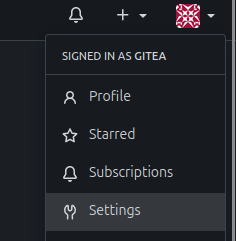
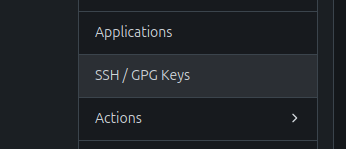
User Settings -> SSH / GPG Keys -> Add Key
#연결 확인
ssh -vT git@<리포지터리주소>

ssh -vT git@20.0.0.254

#오류 발생시 gitea machine에서 gitea가 사용하고 있는 포트 확인
debug1: Next authentication method: password
git@20.0.0.254's password:

sudo ss -lntp | grep gitea

LISTEN 0      4096               *:2222            *:*    users:(("gitea",pid=2726,fd=13))
LISTEN 0      4096               *:3000            *:*    users:(("gitea",pid=2726,fd=14))

#gitea가 사용하고 있는 포트로 연결 확인
ssh -vT -p 2222 git@20.0.0.254


#ssh 설정파일에서 gitea 연결 정보 수정
sudo vi /etc/ssh/ssh_config

Host 호스트명
  HostName <gitea주소>
  User git
  Port 2222
  IdentityFile <프라이빗키>
  IdentitiesOnly yes

Host gitea
  HostName 20.0.0.254
  User git
  Port 2222
  IdentityFile ~/.ssh/id_ed25519
  IdentitiesOnly yes

#연결 확인
ssh -vT gitea

Hi there, gitea! You've successfully authenticated with the key named gitea, but Gitea does not provide shell access.
If this is unexpected, please log in with password and setup Gitea under another user.

#리모트 리포지터리 추가
git remote add local <ssh gitea주소>
git remote add local git@20.0.0.254:gitea/backend.git


ps1.
gitea호스트 설정 값을 ~/.ssh/config에서 읽어온다면
해당 파일에 gitea호스트 정보를 입력

ps2.
remote 주소 잘못 입력했을때
git remote set-url <이름> <ssh 리포지토리주소>
git remote set-url local git@gitea:gitea/script.git